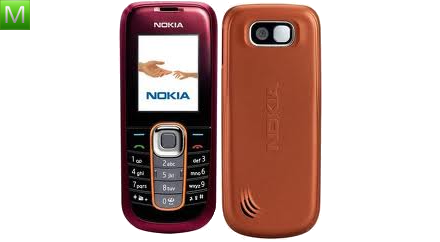
Nokia 2008

Nokia 2600 classic

PDF
2.9User rating
DisplayTFT 64k colors 128 × 160 pixels (1.80 inches)
Storage10 MB
Camera0.3 Mpx, 640x480 px
BatteryLi-Ion 870 mAh
Download English manual
View all available manual languages →

Specifications can vary by region, network and software version.

Device overview

Nokia 2600 classic specifications

Explore the key features and detailed technical specifications available for the Nokia 2600 classic.

Documentation

User manuals

Manual details4 languages
Specifications

General

6 specifications
Release date
January 1, 2008
Release year
2008
Dimensions
109,6 x 46,7 x 12 mm
Weight
73 g
Colors
Black, Orange, Blue, Beige
Physical keyboard
Yes
Specifications

Display and design

2 specifications
Main display
TFT 64k colors 128 × 160 pixels (1.80 inches)
Display details
do3
Specifications

Performance and memory

2 specifications
Storage
10 MB
Memory card included
No
Specifications

Cameras and video

2 specifications
Main camera
0.3 Mpx, 640x480 px
Video recording
H.263 - 8fps, 128x96 px
Specifications

Battery and charging

4 specifications
Battery
Li-Ion 870 mAh
Removable battery
Yes
Standby time
2G: 580 h
Talk time
2G: 6 h
Specifications

Networks and connectivity

7 specifications
SIM type
SIM (standard)
2G bands
900/1800
Bluetooth
Yes, v2.0 EDR
GPRS
Yes, klasa 10
EDGE
Yes, klasa 6
WAP
Yes, v2.0
XHTML
Yes
Specifications

Calls and messaging

6 specifications
Dictionary
Yes, T9
EMS
Yes
MMS
Yes
Speakerphone
Yes
Call forwarding
Yes
Email client
Yes
Specifications

Software and multimedia

7 specifications
Operating system
Nokia OS
OS version
Nokia OS
Interface
Series 40 5th Edition
Audio player
Yes
FM radio
Yes
Polyphony
Yes
Profiles
Yes
Specifications

Organizer and accessibility

7 specifications
Java
Yes, MIDP 2.1
Calendar
Yes
Clock
Yes
Voice recorder
Yes
Organizer
Yes
Alarm
Yes
Calculator
Yes
Specifications

Safety and commercial data

2 specifications
Head SAR
1.43 W/kg
Body SAR
0.49 W/kg
Video guides

Videos

2 videos
Help improve this page

Found an incorrect specification?

Send the model name and the field that needs checking.

Report an error
Download PDF